Quick start
Type Solidity in the composer below the transcript. Press⌘ Enter on macOS or Ctrl Enter elsewhere to commit it as an entry and run it. The result appears directly under that entry.
uint256 amount = 1 ether

amount * 7 / 100

keccak256("hello")
These can be three separate entries. The second entry can use amount because accepted declarations, functions, structs, and contracts remain available to later entries. Normal line breaks create multiline input.
How a run works
Solidity REPL is a browser compiler and EVM runner with a transcript in front of it. It does not interpret a Solidity-like language. Every successful answer comes from the selected Solidity compiler and an EVM execution.
Compiler startup
The compiler begins loading when the editor receives focus, when the browser becomes idle, or when you select Run. If Run comes first, Solidity REPL queues it and starts automatically when the compiler is ready. A compiler release that is not cached must be downloaded before that first run.
What makes a replay reproducible
A session pins its compiler and settings, accepted input, local files, and execution context. A fork also pins the block after its first successful run. Keep those inputs unchanged and a clean replay asks the same EVM question again. Historical fork replay still depends on an RPC provider that can serve the pinned block.
Choose REPL or Source mode
Both modes use the same compiler, EVM, files, execution controls, and inspection data. The difference is how source and state evolve between runs.
The REPL transcript
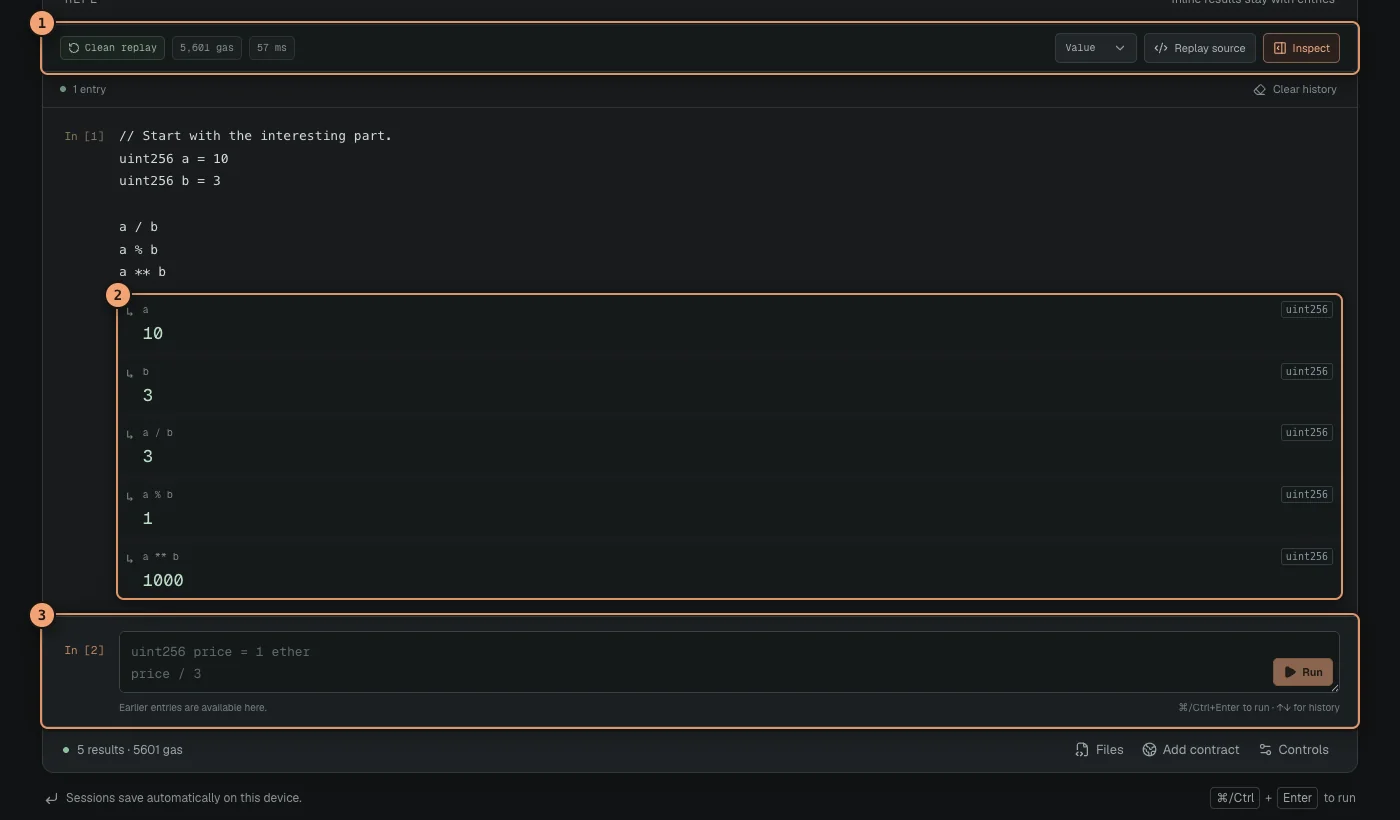
Every committed fragment becomes a numbered transcript entry. Values and errors stay attached to the entry that produced them, so the transcript reads like a complete investigation. The REPL uses the full workspace width by default, keeping the active question and its answer together. Use the arrow keys at the edge of the composer to recall older input.
 Open full size
Accepted entries keep their values inline while the compact strip summarizes the clean replay.
- Clean replay summarizes the accepted history, gas, and duration.
- Inline values stay attached to the entries that produced them.
- The composer accepts the next complete Solidity fragment.
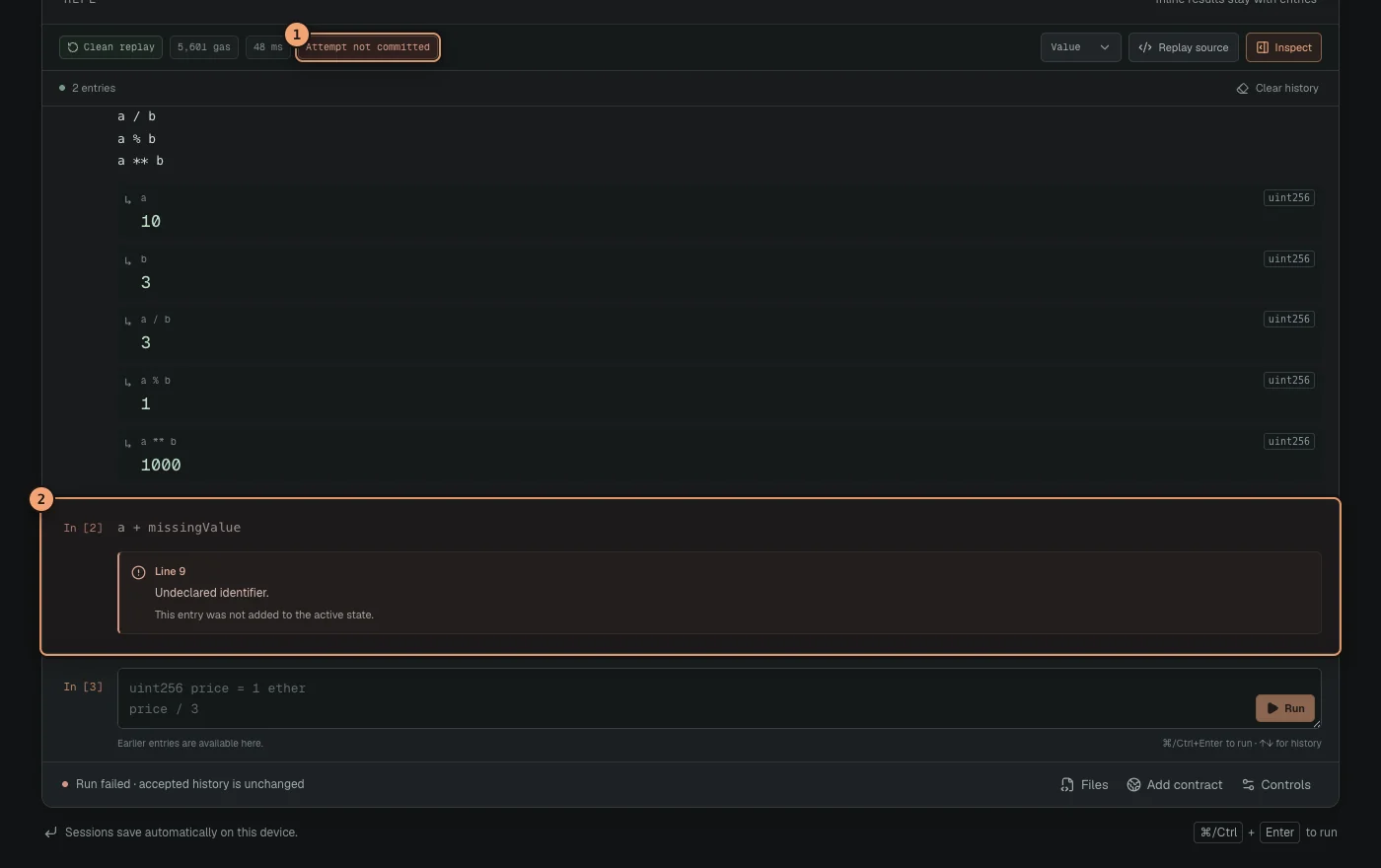
A new entry or edit enters the cumulative program, and a deletion changes it, only after the complete candidate history compiles and executes successfully from a clean EVM. A failed new entry remains visible and editable as a rejected attempt. The replay summary stays on the last accepted history and marks the failed input as Attempt not committed.
 Open full size
A failed entry stays visible while the accepted replay remains unchanged.
- Attempt not committed confirms that the clean accepted replay is still active.
- The rejected entry keeps its attempted code and inline error for correction.
Writing Solidity
Semicolons and a contract wrapper are optional for loose code. Each submitted entry must still be syntactically complete. Put an entire loop, function, struct, contract, or other braced construct in one multiline entry.
Variable declarations, loops, functions, structs, events, interfaces, libraries, contracts, imports, assembly, and normal Solidity syntax can build on definitions from earlier accepted entries.
Expressions
Each loose expression gets an inline result row. Supported types are decoded; other values show Executed with a note when no result display is available.
amount / 1 gweiDeclarations
Declare helpers beside the statements that use them.
square(7)Full contracts
Deploy and call contracts without leaving the page.
Box box = new Box()Results and inspection
In REPL mode, each entry shows its typed values and errors inline. The compact accepted replay summary shows replay status, gas, and duration, then adds counts when the run contains logs, calls, or storage writes. It leaves the rest of the workspace to the transcript. Use the format menu to switch compatible values between display, decimal, hexadecimal, full word, ABI bytes, and JSON.
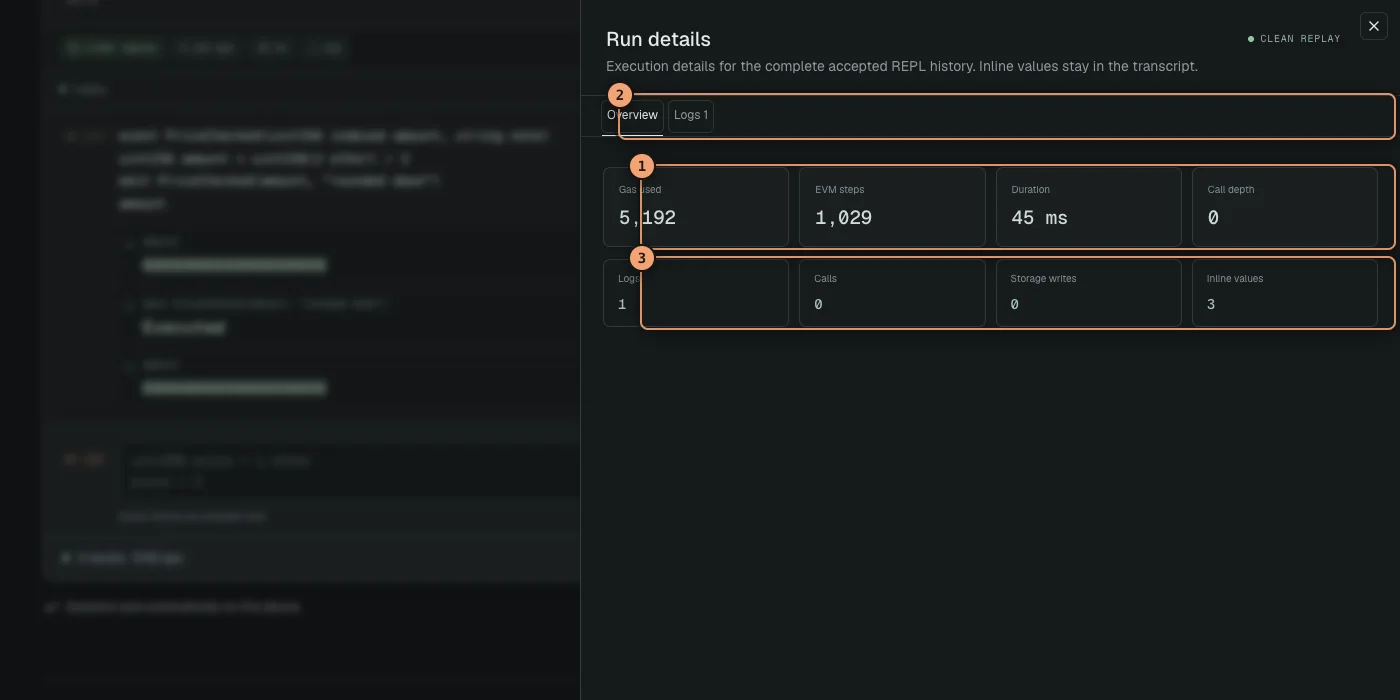
Select Inspect to open a drawer for the clean replay. Its Overview shows gas, EVM steps, duration, call depth, and activity counts. Logs, Calls, State, and Debug tabs appear only when that data exists. Close the drawer to return to the full-width transcript.
 Open full size
Inspect opens on Overview; activity tabs appear only when the replay contains them.
- Metrics summarize gas, EVM steps, duration, and maximum call depth.
- Tabs expose only the detailed activity available for this replay.
- Activity counts show logs, calls, storage writes, and inline values at a glance.
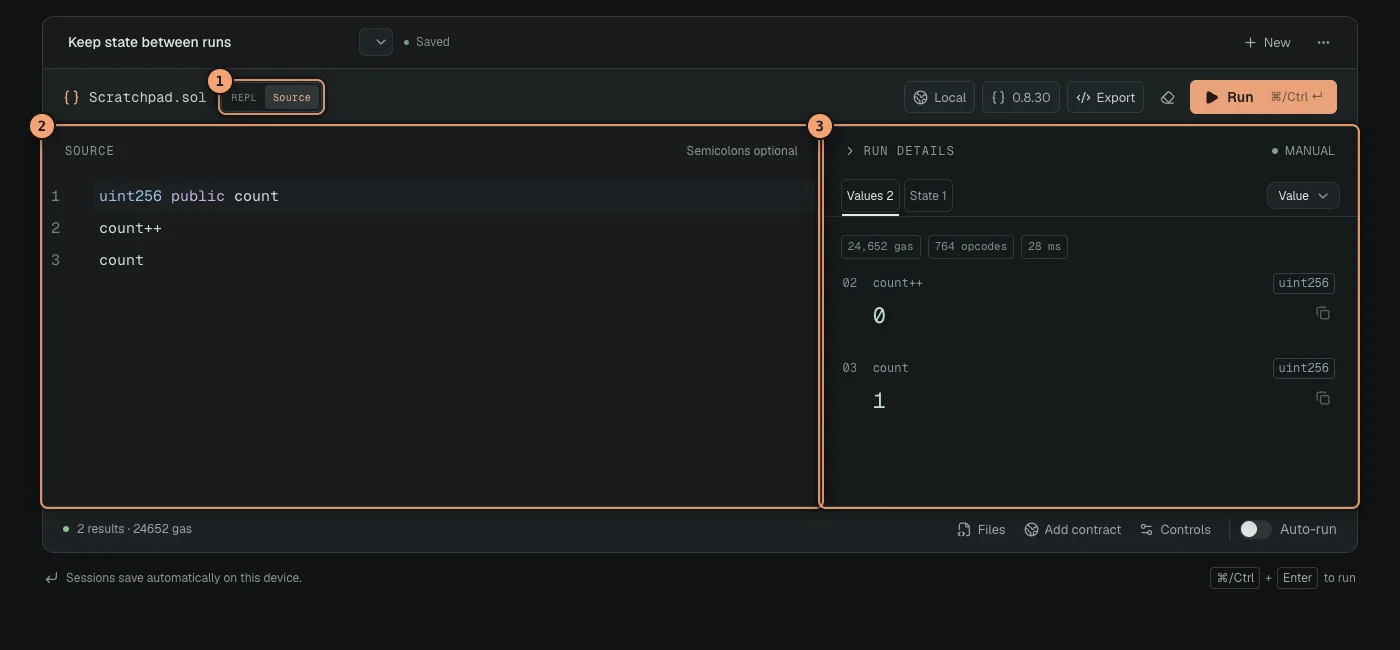
Immediately after a rejection, while the summary shows Attempt not committed, Inspect opens that rejected attempt and labels it Not committed. The accepted transcript remains unchanged. Source mode instead keeps Run details beside the editor. Values is the default after a runnable Source result; Logs, Calls, State, and Debug appear only when the source run produces them. Below 850 pixels wide, Run details stacks beneath the editor.
 Open full size
Source mode keeps Values and available run details beside the complete document.
- The mode toggle switches between the REPL transcript and full Source editing.
- The editor contains the complete Solidity document for this session.
- Run details keeps Values visible and adds activity tabs when data exists.
Compilation and execution errors point back to the original entry and line. REPL changes are transactional, so the accepted replay and its output remain current unless the full candidate replay succeeds. Source typing changes the document immediately; its Run details are marked as results from the previous run until the source runs again.
Sessions
Sessions save automatically on this device, including accepted and rejected transcript entries plus the uncommitted draft. Rename a session at the top of the REPL and use the history button to move between saved work.
- New creates an empty transcript.
- Duplicate creates an independent copy.
- Import session restores a Solidity REPL JSON export.
- Delete removes the active local session.
- Opening a recipe creates a new session, preserving current work.
What is saved
A session stores its transcript and draft, Source document, browser files, compiler settings, execution context, fork configuration, mode, and display preferences. Compiled bytecode and successful execution results are rebuilt when needed, so restored output is tied to the restored inputs.
Execution controls
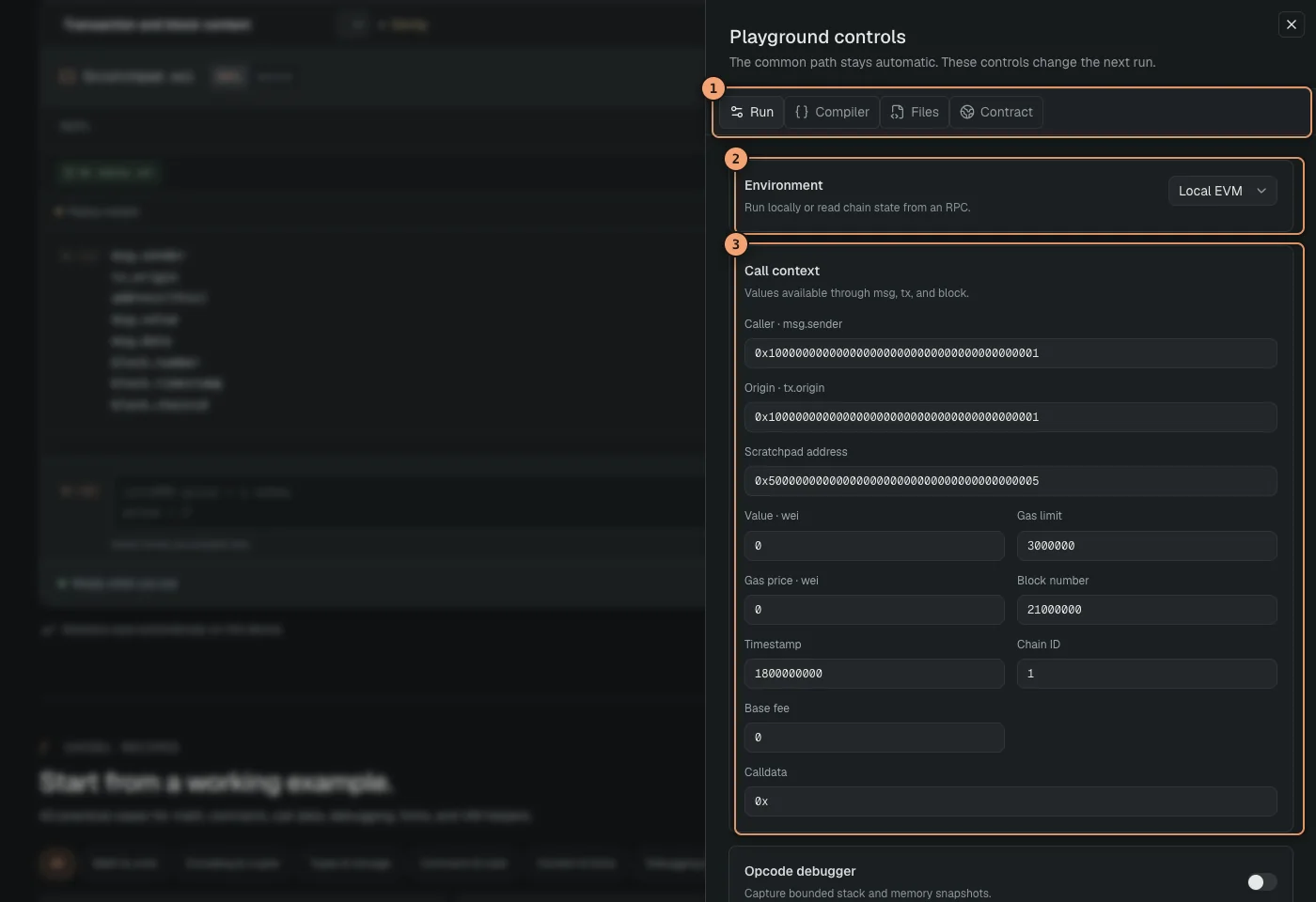
Open Controls → Run to configure the EVM seen by the transcript. You can set msg.sender, tx.origin, the execution address, value, calldata, gas, block number, timestamp, base fee, gas price, and chain ID.
 Open full size
Run controls define the transaction, block, execution, and fork context.
- Control tabs organize run, compiler, file, and verified-contract settings.
- Environment selects a chain fork or a clean local EVM.
- Call context sets sender, value, calldata, gas, and block fields.
Local EVM
Local mode executes entirely in the browser. REPL history is always replayed from a clean deterministic environment. Source mode can enable Keep EVM state when repeated runs should share storage, balances, and deployed contracts.
Fork
Fork reads one block through an EVM-compatible RPC URL. No provider is selected by default. If the URL is empty when you run, Solidity REPL asks for one and continues the pending run after you save it. Enter a block number, or leave it empty to start from the latest block and pin it after the first successful run. Calls and writes are simulated, no transaction is broadcast, and later runs remain reproducible.
Transaction fields and block fields answer different questions. Sender, origin, value, calldata, gas, and gas price describe the call. Block number, timestamp, base fee, and chain ID describe the block context visible to Solidity. The execution address is the address where the generated runner is installed for the simulation.
Change the call context Call USDC on a forkCompiler
Open the Solidity version button above the workspace to search every stable release from 0.4.0 through 0.8.36. Selecting a result pins that exact compiler version to the session, so reopening or exporting the session keeps the same compiler instead of silently moving to a newer release.
When a selected compiler is not already available locally, Solidity REPL downloads its browser build from the official Solidity compiler distribution. The browser caches it for later runs. The first compile with that release can therefore take longer and requires a network connection; a cleared browser cache may require the download again.
Compiler controls follow the capabilities of the selected release. The available EVM targets are limited to those known by that compiler, and options such as via IR appear only when the release supports them. Optimizer settings and optimizer runs are saved with the exact compiler selection. Releases before 0.4.11 use their built-in optimizer run count.
Changing the compiler makes existing results stale. A local REPL session replays its accepted history with the new release; a manual or fork session waits for Run. Source written for a newer release can fail under an older compiler, but the source is left intact so the incompatibility remains visible and you can switch back safely.
| Series | Supported range | Releases | Exact versions |
|---|---|---|---|
| 0.8.x | 0.8.0–0.8.36 | 37 | View versions0.8.36, 0.8.35, 0.8.34, 0.8.33, 0.8.32, 0.8.31, 0.8.30, 0.8.29, 0.8.28, 0.8.27, 0.8.26, 0.8.25, 0.8.24, 0.8.23, 0.8.22, 0.8.21, 0.8.20, 0.8.19, 0.8.18, 0.8.17, 0.8.16, 0.8.15, 0.8.14, 0.8.13, 0.8.12, 0.8.11, 0.8.10, 0.8.9, 0.8.8, 0.8.7, 0.8.6, 0.8.5, 0.8.4, 0.8.3, 0.8.2, 0.8.1, 0.8.0 |
| 0.7.x | 0.7.0–0.7.6 | 7 | View versions0.7.6, 0.7.5, 0.7.4, 0.7.3, 0.7.2, 0.7.1, 0.7.0 |
| 0.6.x | 0.6.0–0.6.12 | 13 | View versions0.6.12, 0.6.11, 0.6.10, 0.6.9, 0.6.8, 0.6.7, 0.6.6, 0.6.5, 0.6.4, 0.6.3, 0.6.2, 0.6.1, 0.6.0 |
| 0.5.x | 0.5.0–0.5.17 | 18 | View versions0.5.17, 0.5.16, 0.5.15, 0.5.14, 0.5.13, 0.5.12, 0.5.11, 0.5.10, 0.5.9, 0.5.8, 0.5.7, 0.5.6, 0.5.5, 0.5.4, 0.5.3, 0.5.2, 0.5.1, 0.5.0 |
| 0.4.x | 0.4.0–0.4.26 | 27 | View versions0.4.26, 0.4.25, 0.4.24, 0.4.23, 0.4.22, 0.4.21, 0.4.20, 0.4.19, 0.4.18, 0.4.17, 0.4.16, 0.4.15, 0.4.14, 0.4.13, 0.4.12, 0.4.11, 0.4.10, 0.4.9, 0.4.8, 0.4.7, 0.4.6, 0.4.5, 0.4.4, 0.4.3, 0.4.2, 0.4.1, 0.4.0 |
Files and verified contracts
Use Files to add in-browser .sol files. Import them from a transcript entry or Source mode using a relative path.
import "./MathLib.sol"
MathLib.double(21)
Import a public Git repository
Open Files → Import public Git repository and paste a public HTTPS clone or repository URL. Optionally pin a branch or tag and narrow the scan to one subdirectory. Solidity REPL reads one immutable repository snapshot, shows the resolved commit, and lets you select the .sol files to add. Relative Solidity dependencies from the same repository are included automatically.
- GitHub, GitLab, Bitbucket, Codeberg, self-hosted Git services, and other public smart-HTTP repositories use the same flow.
- Imported paths are rooted under the repository name, such as
openzeppelin-contracts/contracts/token/ERC20/ERC20.sol, so relative imports inside the repository remain stable. Only the files reachable from imports in your active entry or Source document are sent to the compiler. - The commit hash records the exact snapshot. Imported files are copied into the session and do not update until you scan and import again.
- Only anonymous HTTPS reads are supported. Private repositories, SSH URLs, credentials, submodules, Git LFS objects, and package installation are outside this importer.
Use Add contract with a chain ID and address to request a verified ABI from Sourcify. Choose Fork or Local. Solidity REPL generates a typed interface, inserts a ready-to-use contract variable, and applies the selected execution mode to the session.
What Add contract does
A successful verified-source lookup and a successful contract call are separate operations. The first obtains compile-time types from Sourcify; the second obtains runtime state from your RPC. Proxies may also require you to load the implementation interface while calling the proxy address.
Persistent state and VM helpers
In Source mode, Keep EVM state preserves storage, balances, and deployed contracts between manual runs in the current browser tab. Reset EVM state makes the next Source run start from the configured environment. REPL mode uses deterministic cumulative replay instead, so a transcript never depends on hidden state from an earlier run.
Supported local EVM helpers include:
vm.deal(account, 10 ether)
vm.store(contractAddress, slot, value)
vm.load(contractAddress, slot)
vm.warp(newTimestamp)
vm.roll(newBlockNumber)
vm.etch(target, runtimeBytecode)
vm.label assigns a readable local name but currently does not change displayed addresses.
Opcode debugger
Enable Opcode debugger under Run controls. Turning it on keeps later runs manual because capturing execution steps costs more work. A prepared debugger example still runs once when it opens. In REPL mode, select Inspect, open the Debug tab, and choose an opcode. In Source mode, use the Debug tab in the permanent Run details panel. Both views show remaining gas, call depth, source line, stack, and memory.
Generated source and export
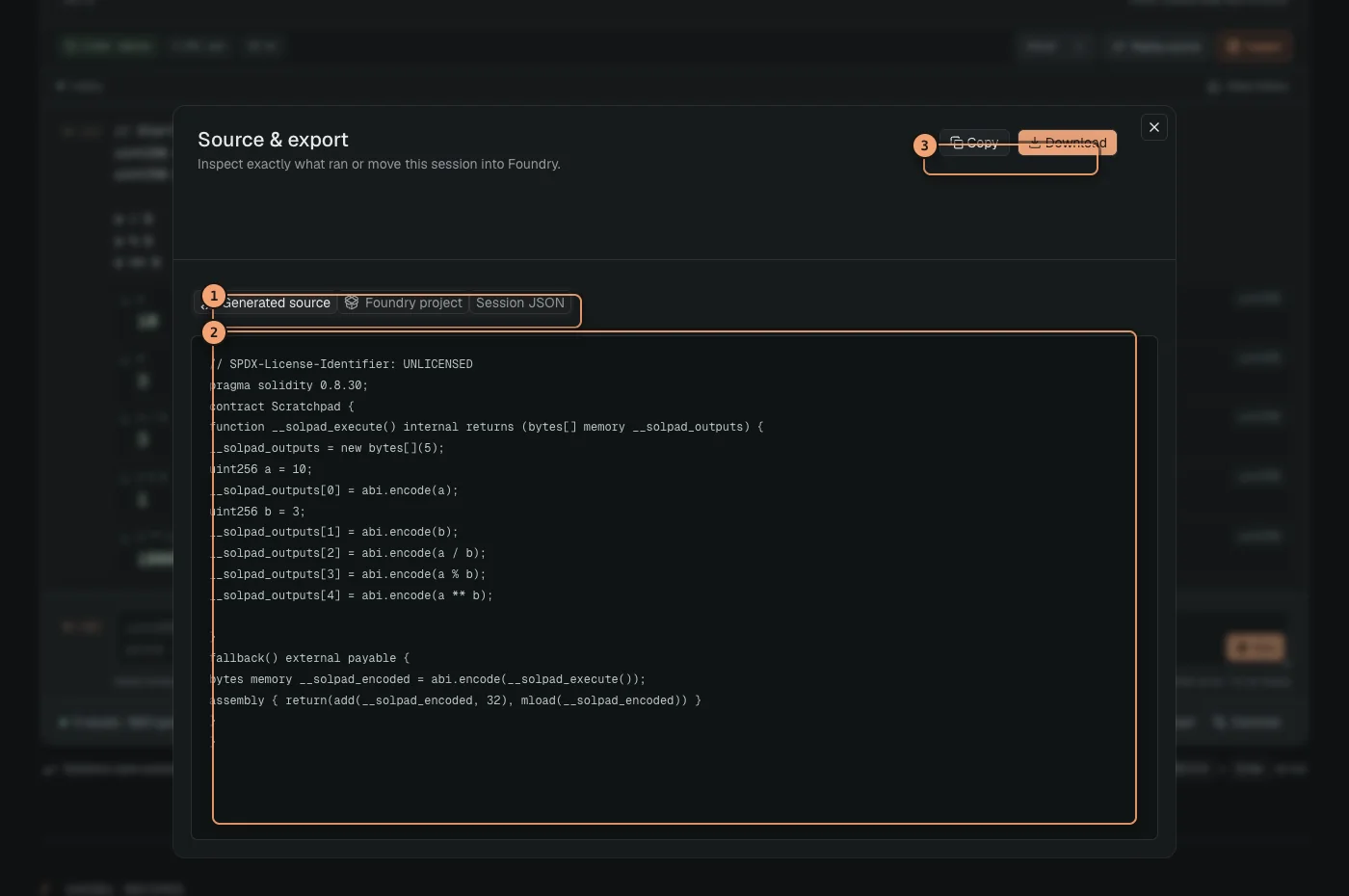
In REPL mode, choose Replay source to open the Source & export dialog. Its Generated source tab contains the complete Solidity wrapper compiled for the accepted replay. Switch to Source mode from the mode control when you want to edit the full document. Run details stays beside the editor on wider screens and stacks below it on narrow screens.
 Open full size
Replay source opens the compiled wrapper alongside Foundry and session exports.
- Export tabs switch between generated source, the Foundry project, and session JSON.
- Generated source shows the complete Solidity wrapper compiled for the replay.
- Copy and download actions export the content shown in the active tab.
Opening Source mode preserves the transcript. If you edit the full document, Solidity REPL shows a conversion notice. When you switch back, it first validates the complete document. A successful validation turns it into one accepted REPL entry; a failure leaves you in Source mode with the document unchanged.
- The Foundry archive includes source, project files, compiler settings, and a reproduction script for Solidity 0.8.0 and newer. Legacy sessions can still export generated source and session JSON.
- The session JSON restores transcript entries, the draft, source, files, compiler, context, and preferences.
- RPC URLs are removed from exported session files.
Shortcuts and command palette
The command palette also opens execution, compiler, file, contract, debug, export, new-session, mode-switch, and Source-mode auto-run actions.
REPL commands
:helpShow the available REPL commands and shortcuts.:clearClear every transcript entry and start empty.:resetReset the replay environment and rerun accepted history.:sourceOpen the generated source and export dialog. This does not switch the editable workspace to Source mode.:settingsOpen execution controls.Troubleshooting
Start with the status beneath the workspace and the error attached to the current entry or Source run. Solidity REPL distinguishes compiler startup, compilation, RPC access, EVM reverts, and rejected history so the failing stage stays visible.
.sol suffix. Imports must use safe relative paths; package downloads are unavailable.Reduce the problem without losing evidence
- Duplicate the session so the original record remains.
- Keep the compiler, optimizer, EVM target, and execution context fixed.
- Remove unrelated later entries, then edit the earliest entry involved in the failure.
- Inspect the revert, calls, and state before enabling the opcode debugger.
- Export the session once the smallest reproduction still shows the behavior.
Privacy and current limits
Source compilation and EVM execution happen in the browser. Network access is tied to a visible feature or to loading the application itself.
Current source boundaries
- Project files are in-browser
.solfiles; public Git import is supported, while package-manager installation is not. - Top-level fallback and receive functions must be placed inside a named contract.
Practical limits
- During live use, accepted REPL source is limited to 48,000 characters and an evaluation stops after 20 seconds.
- Each evaluation accepts up to 80 loose top-level statements.
- When saved data is restored and normalized, Solidity REPL keeps up to 250 entries and 96,000 transcript characters, including rejected attempts.
- Solidity REPL uses and restores up to 128 valid browser files, each no larger than 100,000 characters, with a combined source limit of 4,000,000 characters.
- An execution records up to 100 call records.
- Opcode debugging captures up to 600 steps and displays the first 240.